Full account control
Our goal has always been to make learning about sustainability rewarding and accessible. As you complete courses and earn B3TR, your account grows, and so should your ability to manage it. Today, we are excited to introduce three account updates designed to give you more control, flexibility, and ownership over your Terrademia experience.
Or, for those OG's that have been part of the VeChain ecosystem since 2018, its time “to bring the power in your hands”.
Whether you want to guide where your votes go, sign in from different devices seamlessly, or take full custody of your hard-earned rewards, these new features put you in the driver’s seat.
Custom Voting Preferences
When you first join Terrademia and use a managed wallet (a wallet where the platform handles the technical setup for you), we can automatically stake your B3TR rewards and vote on your behalf during VeBetterDAO allocation rounds. This was in a win-win, you receive extra rewards from voting, while we receive more rewards to give out if we receive more votes.
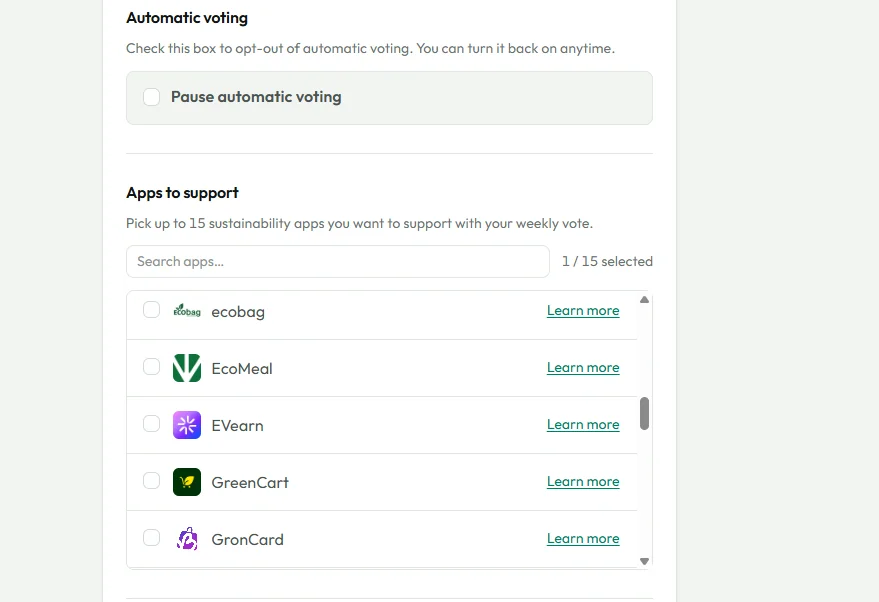
Until now, automatic voting settings were limited to turning it off or selecting which app to support from a few hand picked options. With our new update, you can now change your voting preferences to support any other app in the VeBetter ecosystem. As before, it continues to be up to you if you want to have your account take part in the weekly voting rounds.
How to use it
You can update your choices at any time by visiting your Voting preferences:
- Go to your Account page and click on Settings.
- Open the Voting pane
- To change your vote, select the specific VeBetterDAO apps you wish to support with your automatic votes.
- To opt out completely, simply check the opt-out checkbox to pause automatic voting. You can uncheck this to turn it back on whenever you like.
Why it helps
This feature gives you a direct voice in the VeBetterDAO ecosystem. If you discover new apps you are passionate about, you can easily align your votes to support them without having to manually vote every week. If you plan to move to a self-hosted wallet soon, opting out lets you pause the platform’s automatic actions so your account is ready for the transition.
Keep in mind: These voting settings only apply if you are using a managed wallet. If you use a self-hosted wallet, you will continue to vote yourself on vebetterdao.org. Also, please note that keeping your automatic vote set to Terrademia is always appreciated, as it directly helps fund the course rewards for everyone learning on the platform!
Multi-Provider Login
We know that how you log in can change depending on where you are. You might use your work computer with Microsoft during the day, your personal phone with a Google account in the evening, or X (Twitter) when browsing social media.
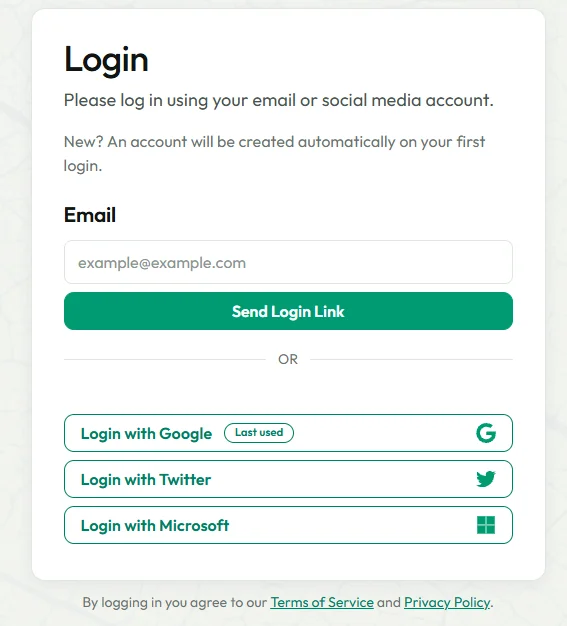
Previously, logging in with a different method could create a brand-new, empty account. Now, you can sign in with different login methods into the exact same account, as long as the email address matches. We currently support Google, Microsoft, X (Twitter), and Email (a secure login link sent to your email).
How to use it
There are no settings to toggle and no "link accounts" buttons to click. The process is completely automatic:
- Simply log in using your preferred method (Google, Microsoft, X, or Mail).
- If the email address provided by that login method matches the email on your existing Terrademia account, the new login method is instantly attached to your profile.
- You will see your existing course progress, rewards, and wallet exactly as you left them.
Why it helps
This update eliminates the frustration of "wrong account" logins. You can use whichever method is most convenient for you at that moment without worrying about losing your course progress or having your B3TR scattered across multiple profiles.
Keep in mind: The email from your new login method must be identical to the email on your existing Terrademia account. If a provider (like X) does not share an email, or uses a different one, a new account will be created. We recommend sticking to providers that use your primary email address.
Convert to a Self-Hosted Wallet
For many users, starting with a managed wallet is the easiest way to get started on our platform. However, as you become more comfortable with Web3, you might want to take direct ownership of your assets.
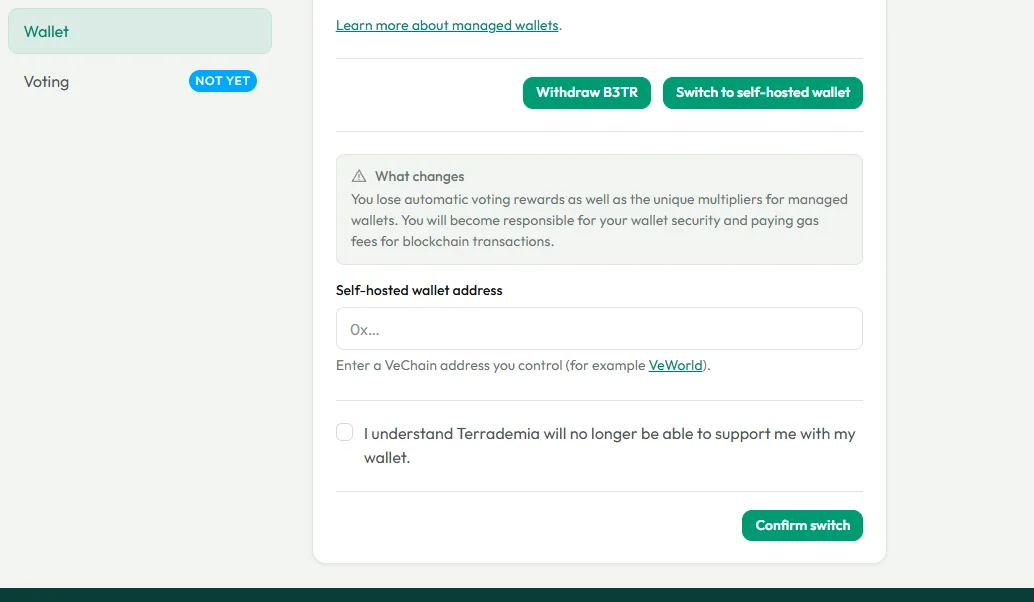
We now offer the ability to switch your account from a managed wallet to a self-hosted wallet. A self-hosted wallet (like VeWorld) is a VeChain address where you alone control the private keys and handle your own voting and transactions.
How to use it
Switching to a self-hosted wallet is a deliberate cutover process. When you are ready, follow these exact steps:
- Go to your Account settings and open the Wallet panel.
- Withdraw all of your B3TR from your managed wallet. Doing this will automatically pause your automatic voting so that no new rewards are staked while you are trying to switch. (Note: Security rules limit withdrawals to once every 24 hours).
- Wait until your withdrawal (and any pending voting updates) fully confirms on the network.
- Once cleared, enter your new self-hosted VeChain address into the designated field and confirm the switch.
Why it helps
Switching gives you true, full custody of your keys and allows you to store other VeChain based crypto assets in your wallets. It allows you the absolute freedom to use the same wallet for other applications in the VeChain and VeBetter ecosystem. Best of all, you keep your exact same Terrademia learning account and course progress.
Keep in mind: After you make the switch, Terrademia will no longer stake, vote, or withdraw for you. All new course rewards will be sent directly to your self-hosted address. Because you are taking over custody, you will be responsible for providing your own gas (VTHO) to pay for transactions and you will need to vote manually.
Ready to explore these new features and customize your experience? Head over to your Account Settings to get started!